Shopify Google Ads Audit: Where Your Budget Leaks (Search Terms, PMax, Brand)
Shopify Google Ads audit: find budget leaks in search terms, Performance Max, brand cannibalization, and placements before you burn another month's spend.

Mark Cijo
Founder, GOSH Digital
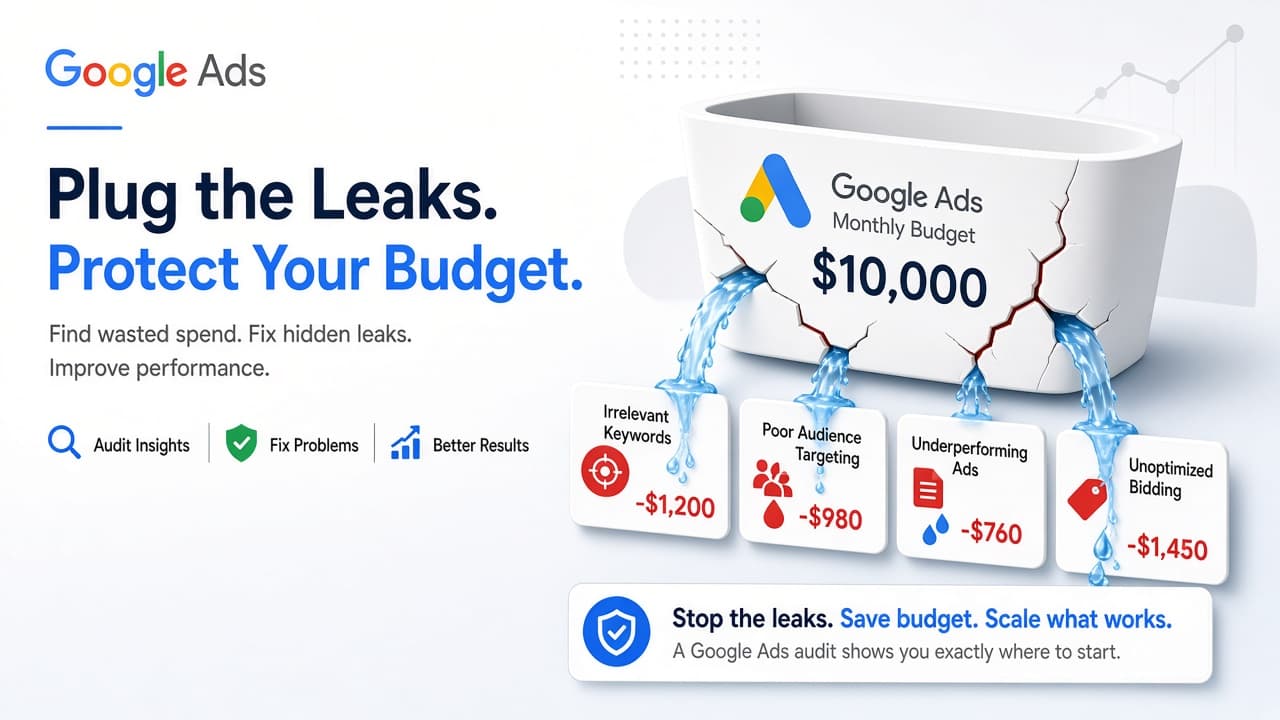
Your Google Ads account is bleeding money and you probably don't know where.
Last reviewed: October 23, 2026. All Google Ads feature references verified against the Google Ads Help Center.
Most Shopify Google Ads accounts have fixable budget leaks hiding in plain sight. Not small inefficiencies. Not "could be optimized." Actual money-on-fire problems: branded searches you'd get organically, Performance Max eating your brand traffic and calling it "new customers," Shopping campaigns matching to "how to make" queries, mobile app placements with near-zero conversion rates, no negative keywords for months.
And the founder has no idea because Google's reporting makes everything look fine. "Conversions are up!" Sure. But you're paying for traffic you already owned.
Here's exactly where the leaks hide in Shopify Google Ads accounts, how to find them in your account, and what to do about it.
Why Google Ads Audits Matter More for Shopify Stores
Shopify stores have specific vulnerabilities.
The Shopify-Google integration is set-and-forget. You install the Google channel app, sync your products, and launch campaigns. Shopify auto-generates your product feed from your catalog. Problem: Shopify's default product titles and descriptions often aren't optimized for Google Shopping. "Blue Shirt" becomes your Shopping title. Google matches it to irrelevant searches, you waste budget, and Shopping looks like it doesn't work.
Most Shopify merchants launch Performance Max first (because Google pushes it hard) without setting up brand protection. PMax immediately grabs all your branded traffic, shows you a 6x ROAS, and you think it's working. It's just stealing conversions from people who were already searching your brand name.
Shopify stores often have hundreds or thousands of SKUs. More products = more opportunities for budget to leak into long-tail, low-intent queries that generate clicks but no sales.
The default setup creates waste unless you audit and tighten it.
The 5 Biggest Budget Leaks (And How to Find Them)
Leak 1: Performance Max Cannibalizing Your Brand Search
This is the single biggest leak.
You launch Performance Max. Google's algorithm looks for the easiest conversions. The easiest conversions are people who already know your brand and are searching for you by name. PMax serves them an ad (that they would've clicked anyway) and claims credit for the sale.
Your brand search volume drops. PMax conversions go up. Google shows you "PMax ROAS: 8x" and you think you found a goldmine. You didn't. You just moved existing revenue from one bucket to another and started paying for traffic you used to get organically or cheaply.
How to check:
Go to your Performance Max campaign → Insights & reports → Search terms (or Search term insights).
If your brand name or close variants are in the top 5 search terms, PMax is eating your branded traffic.
The fix:
Performance Max now supports campaign-level negative keywords (rolled out to all advertisers). (Source: Google Ads Help) To add them:
- Go to your PMax campaign
- Click Keywords → Negative keywords tab
- Add your brand name as a campaign-level negative keyword
- Include common misspellings
Campaign-level negative keywords apply to Search and Shopping inventory only. The current limit is 10,000 negative keywords per Performance Max campaign. (Source: Google Ads Help)
Alternative: Use brand exclusions for stronger brand protection. Go to your PMax campaign settings → Additional settings → Brand exclusions, then create or select a brand list. Brand exclusions apply to Search, Shopping, and YouTube search inventory and automatically block misspellings and foreign-script variants (more comprehensive than negative keywords). (Source: Google Ads Help, Brand exclusions overview)
Alternative: Set up a dedicated brand search campaign with exact match on your brand name and higher priority. This campaign should win the auction over PMax for branded queries. Monitor your PMax search terms weekly. If branded traffic still leaks through, pause PMax and rely on Shopping + Search.
Leak 2: Shopping Campaigns with No Negative Keywords
Standard Shopping campaigns have no keyword targeting. Google looks at your product feed (title, description, product type) and decides which searches to show your ads for. You don't control the match.
Without negative keywords, your Shopping ads can show for:
- "Free [product]" (people looking for giveaways)
- "How to make [product]" (DIY tutorials, zero purchase intent)
- "Used [product]" (secondhand shoppers)
- "[Competitor] vs [your brand]" (comparison research)
- "What is [product category]" (informational queries)
Every one of those clicks costs you money.
How to check:
Go to your Shopping campaign → Search terms report. Filter by Added/Excluded status = "None". Sort by Cost descending.
Look at the top 20 search terms by spend. You'll likely find several that have zero chance of converting.
The fix:
Add negative keywords at the campaign level so they apply to all product groups.
Common negative keywords for Shopify Shopping campaigns:
- free
- how to
- diy
- tutorial
- used
- cheap
- wholesale (unless you sell wholesale)
- repair
- return policy
For product-specific terms, add as exact or phrase match negatives.
How often: Review search terms at least weekly for active campaigns. Daily for the first week of new campaigns, then weekly ongoing. (Source: Google Ads Help on negative keywords, Shopping campaign negative keywords)
Leak 3: Performance Max Spending on Low-Quality Placements
Performance Max runs across Search, Shopping, Display, YouTube, Gmail, and Discover. The algorithm decides where to allocate budget based on what converts.
Problem: If you've set up multiple conversion events ("Purchase," "Add to Cart," "Begin Checkout"), PMax may chase the easiest one (usually Add to Cart) and burn budget on Display placements that generate cheap micro-conversions but never turn into sales.
How to check:
Go to Performance Max campaign → Insights & reports → Placement performance or Asset group performance.
Look at the breakdown by channel: Search, Shopping, Display, YouTube, Discovery, Gmail.
Red flags:
- Display taking 40%+ of budget with sub-1% purchase conversion rate
- YouTube with big spend but zero purchases
- Gmail placements (rarely work for cold eCommerce traffic)
The fix:
You can't directly exclude placements in PMax (only at the account level). But you can influence where budget goes:
Prioritize purchase conversions: Go to Tools & settings → Measurement → Conversions. Set your Purchase conversion action as "Primary" and set other actions (Add to Cart, Begin Checkout) as "Secondary." This tells Google to optimize PMax for purchases, not just easy micro-conversions. (Source: Google Ads Help on primary/secondary conversion actions)
Improve asset quality: If Search and Shopping perform well but Display drags down results, add higher-quality images, better video creative, and stronger headlines.
When assets improve, PMax reallocates budget toward better placements.
Split PMax campaigns by intent: Run separate PMax campaigns for prospecting (cold traffic) and retargeting (warm traffic), with different ROAS targets for each.
This gives you more control than one campaign trying to do everything.
Leak 4: Mobile App Placements Burning Budget
Google Display Network (and PMax when it runs display inventory) includes mobile app placements: your ads show inside mobile games, utility apps, news apps. The problem is accidental clicks. People tap your ad trying to close it, bounce immediately, and you pay for that click.
How to check:
If you're running Display or PMax with Display inventory:
Go to Campaign → Content → Placements → Where ads showed.
Filter by placement type = "Mobile app." Sort by Cost descending.
Look at the conversion rate column. If it's under 0.5%, those placements are bleeding budget.
The fix:
For Display campaigns, you can exclude mobile app categories or individual apps at the campaign level.
For PMax, you cannot exclude placements at the campaign level. Performance Max respects account-level placement exclusions only. Go to Tools → Content suitability → Advanced settings → Excluded placements and add mobile apps there. These exclusions apply to all campaigns in the account. (Source: Google Ads Help on account-level exclusions, PMax brand suitability)
Alternatively: Remove display-focused assets from PMax to reduce display budget allocation, or use a separate Display campaign with app exclusions for retargeting and keep PMax focused on Search/Shopping.
Leak 5: No Separate Brand Campaign
Branded search (people Googling your store name) should be your cheapest, highest-converting traffic. CPCs for your own brand name are often in the $0.10-$0.50 range depending on competition.
But if you don't have a dedicated brand campaign:
- Your Shopping campaigns bid on branded queries
- Your PMax campaigns bid on branded queries
- Your competitors may bid on your brand name to steal traffic
Google runs an auction for every search, even your brand name. If you're not bidding with a dedicated exact-match brand campaign, you're either letting PMax claim the conversion at a higher CPC, or you're missing the click entirely.
How to check:
Run a search term report across all campaigns. Filter for your brand name. Check the Avg. CPC column.
If your branded CPC is above $1.00, you don't have proper brand protection.
The fix:
Create a dedicated brand search campaign with:
- Campaign type: Search
- Keywords: Your brand name (exact match), common misspellings (exact match), "[brand] + product category" (phrase match)
- Bid strategy: Manual CPC or Maximize Clicks
- Ad copy: Brand-specific (free shipping, bestsellers, current offers)
- Sitelinks: Top categories, About page, Reviews page
Then exclude your brand from PMax and Shopping (add brand as a negative keyword or brand exclusion so they don't compete with your brand campaign).
Result: Your branded CPC drops, and you control the ad copy and landing page for your most valuable traffic.
Note: Campaign priority settings apply to Standard Shopping campaigns only, not Performance Max. (Source: Google Ads Help on campaign priority)
If you're spending $10k+/month on Google Ads and you're not sure where the waste is hiding, I can walk you through it.
Book a Google Ads audit call here →
The Audit Checklist
Run this audit at least quarterly. Weekly for search terms.
Budget Allocation Check
- Brand search campaign exists and accounts for 5-15% of total spend
- Shopping campaigns account for 40-50% of spend
- Performance Max accounts for 30-40% of spend (not 80%+)
- Display/remarketing under 10% of spend
If PMax is 60%+ of your budget, check PMax search terms to see if it's claiming credit for branded traffic.
Search Term Check (Weekly)
- Pulled search term reports for Shopping and Search campaigns (past 7-14 days)
- Identified high-spend, zero-conversion terms and added them as negatives
- Checked PMax search term insights for branded queries
- Added new negative keywords based on irrelevant queries
Conversion Tracking Check
- Purchase conversion event is firing correctly (test order shows up in Google Ads within 24 hours)
- Purchase is set as "Primary" conversion goal
- Conversion values are passing through (actual order values, not just "1 conversion")
- Micro-conversions (ATC, Begin Checkout) are set as "Secondary"
If conversion tracking is broken, every campaign optimizes wrong.
(Source: Google Ads Help on verifying conversion tracking)
Performance Max Health Check
- PMax asset groups are split by product category or margin tier
- Each asset group has 3+ headlines, 3+ descriptions, 5+ images, and at least 1 video
- Audience signals include customer match list + website visitors
- PMax search terms don't show your brand name in top 5
- PMax placement report doesn't show Display eating 50%+ of budget at sub-1% purchase CVR
Feed Quality Check
- Product titles include primary keyword + brand + key attributes (not just "Blue Shirt")
- Product descriptions are unique and keyword-rich
- Google Product Category is set for every product
- High-quality images uploaded (white background preferred, no text overlays)
- Prices and availability are synced in real-time
The Google channel app in Shopify auto-syncs your catalog, but feed quality depends on how you've filled out your product data in Shopify. (Source: Google Merchant Center product data requirements)
Hypothetical Example: Where $8,000/Month Could Go Wrong
Here's an illustrative scenario based on common audit patterns (not a real client, but representative of typical issues):
Hypothetical: Shopify store in a consumer goods niche, $8,000/month Google Ads budget
What the dashboard showed:
- Performance Max ROAS: 4.2x
- Shopping ROAS: 3.8x
- Total conversions: 180/month
What an audit might find:
Brand cannibalization: PMax top search term = brand name.
If 40% of PMax conversions were branded searches, actual new customer acquisition would be much lower than reported.
Adding brand exclusions to PMax and setting up a dedicated brand campaign could drop branded CPC from $1.80 to $0.35.
PMax reported ROAS might drop to 2.8x (because you removed the easy wins), but total business revenue would stay flat: the branded conversions just move to the cheaper brand campaign.
Informational queries: Shopping campaign with no negative keywords. Search term report might show:
- "how to choose [product]": clicks with no conversions
- "best budget [product category]": clicks with no conversions
- "used [product]": clicks with no conversions
Adding negative keywords (how to, best budget, used, cheap, diy, free) could cut significant Shopping spend.
Mobile app placements: PMax running display inventory.
Placement report might show mobile app placements with sub-0.1% conversion rate.
Account-level exclusions or tightening audience signals could reduce wasted display spend.
Feed quality: Generic product titles in Shopify like "Men's Jacket, Blue."
Rewriting titles to include keywords ("Men's Waterproof Hiking Jacket, Lightweight Packable, Navy Blue, Brand Name") could improve match quality: fewer irrelevant clicks, higher CTR, better conversion rate.
That's what an audit does. It finds waste and reallocates it.
What About Google's "Optimization Score"?
Google Ads shows you an "Optimization Score" (0-100%) and suggests changes to "improve" your account.
Take it with a grain of salt.
Google's optimization score is designed to increase spend, not efficiency. Suggestions often include:
- "Add more keywords" (usually broad match, which can increase irrelevant spend)
- "Increase your budget"
- "Switch to automated bidding"
- "Use all available ad formats"
Some suggestions are good (fix disapproved ads, add sitelinks, enable conversion tracking). But many optimize for Google's revenue, not yours.
Better metrics: Cost per acquisition (CPA) and ROAS by campaign. If CPA is rising or ROAS is falling, you have a problem. If Google's optimization score is 60% but your ROAS is healthy and CPA is below target, you're fine.
When to Audit vs When to Rebuild
Most accounts need an audit and cleanup. Some need to be torn down and rebuilt.
You need an audit if:
- Account is 6+ months old and hasn't been reviewed
- You're getting conversions, but ROAS is below target
- You launched campaigns yourself or inherited them
- You're spending $5k-$30k+/month and it should work better
You need a rebuild if:
- Conversion tracking has been broken for months (historical data is unreliable)
- Campaign structure is tangled (20+ campaigns, no clear naming, no strategy) and fixing it would take longer than starting over
- You're spending $50k+/month with no idea if it's profitable (no tracking, no segmentation)
Rebuilding is rare. Most accounts are fixable.
Should You Do This Yourself or Hire Someone?
You can run this audit yourself if you're comfortable in Google Ads.
What you can do yourself:
- Pull search term reports and add negative keywords
- Check if you have a brand campaign (and set one up if you don't)
- Verify conversion tracking is working (run a test order)
- Review your product feed quality in Google Merchant Center
- Check budget allocation across campaigns
Where most people get stuck:
- Diagnosing whether PMax is actually working or just stealing branded traffic
- Knowing which leaks to fix first
- Fixing feed quality issues if your Shopify catalog structure is messy
- Setting up proper campaign structure so campaigns don't compete with each other
If you run through this checklist, find problems, but don't know how to prioritize or fix them without tanking performance, outside help can clarify that.
At GOSH Digital, we work with 150+ clients, $70M+ revenue driven, and $23M+ ad spend managed. We run this exact audit (plus deeper dives into attribution, incrementality, and feed optimization) in our paid media audits.
If your Google Ads account is spending $10k+/month and you're not sure it's working as well as it should, book a paid media audit call here. We'll review the account, find the leaks, and tell you exactly what's broken and what to do about it.
Related reading:

Written by Mark Cijo
Founder of GOSH Digital. Klaviyo Gold Partner. Helping eCommerce brands grow revenue through data-driven marketing.
Book a free strategy call →