Is Klaviyo Over-Reporting Your Email Revenue? How to Run a Holdout Test
Klaviyo says email drove $50K. Your backend shows $28K. Here's how to run a holdout test to measure the real incremental lift email actually delivers.

Mark Cijo
Founder, GOSH Digital
Klaviyo says email drove $50K last month. Your backend analytics show $28K attributed to email. Meta says it drove $40K. Add them up and you've got $118K claimed from $75K in actual revenue.
Platforms over-attribute. It's not fraud: it's how last-touch attribution works in a world where customers click three ads, open two emails, and Google your brand name before buying.
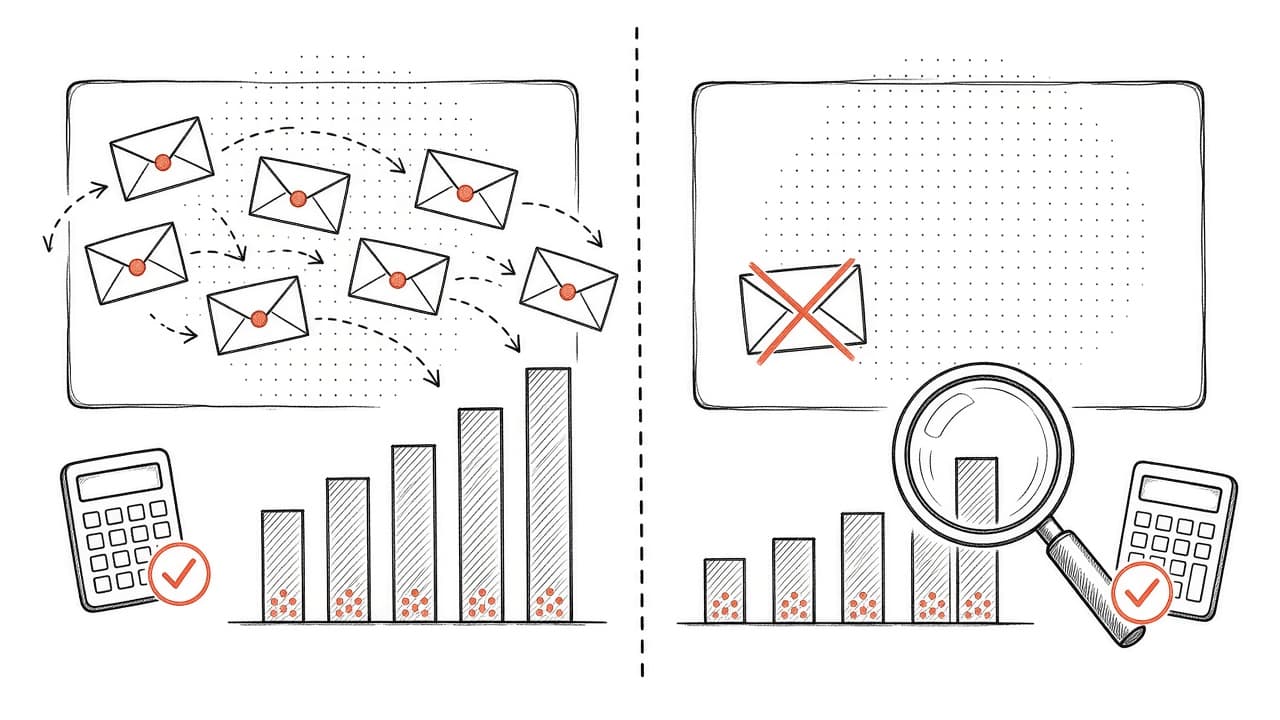
The way to know email's real incremental contribution is a holdout test. You suppress email to a random sample of your list for 60-90 days and compare their purchase behavior to people who got all your emails. The revenue difference is what email actually drove, not what Klaviyo thinks it drove.
Last reviewed: October 19, 2026. All Klaviyo feature references verified against the official Klaviyo Help Center.
Why Klaviyo Attribution Inflates Email Revenue
According to Klaviyo's attribution documentation, "By default, Klaviyo uses a last touch attribution model with the following lookback window for all new accounts: 5 days for email clicks [and] 5 days for email opens."
That means:
- Someone clicks an email Monday. They buy Thursday. Klaviyo gets credit.
- Someone opens (but doesn't click) an email Tuesday morning. They buy Tuesday evening after searching your brand on Google. Klaviyo still gets credit because the purchase happened within the 5-day open window.
The problem: many of those purchases would have happened anyway. A loyal customer who buys from you every month doesn't need your email to remind them. They were going to buy. The email just happened to be in their inbox when they were already planning to shop.
Attribution != causation. Klaviyo is measuring correlation (purchases that happened after email exposure), not incremental lift (purchases that only happened because of email).
Scenario: The Returning Customer Who Was Already Buying
Illustrative example: A customer bought from you 30 days ago. They're a repeat buyer with an average purchase cycle of 32 days. Your Klaviyo replenishment flow sends them a reminder email on day 28.
They open the email, don't click, and three days later they place another order. Klaviyo attributes that purchase to email because it happened within the attribution window.
But they were already on track to reorder. The email didn't create the purchase; the product running out did. Klaviyo claimed credit for behavior that was already happening.
Multiply this across hundreds of purchases per month and your reported email revenue is substantially higher than the incremental revenue email is actually creating.
How Holdout Tests Measure True Incremental Lift
A holdout test (also called incrementality test or control group test) splits your email list into two randomly selected groups:
- Treatment group (95%): Receives all your email campaigns and flows as normal
- Holdout group (5%): Receives no marketing emails for the test period (typically 60-90 days)
Both groups can still buy from you. They see your ads, they can visit your site directly, they get retargeting. The only difference is one group gets email and one doesn't.
At the end of the test period, you compare the revenue per customer between the two groups. The difference is your email program's true incremental lift.
The Math
Illustrative example with made-up round numbers:
Treatment group (95% of list):
- 9,500 customers, $950,000 total revenue
- Revenue per customer: $100
Holdout group (5% of list):
- 500 customers, $42,500 total revenue
- Revenue per customer: $85
Incremental lift per customer: $100 - $85 = $15
Total incremental revenue from email: 10,000 customers × $15 = $150,000
In this example, Klaviyo might have reported $950,000 in email-attributed revenue (everything the treatment group bought), but the actual incremental contribution was only $150,000 — the extra $15 per customer that email drove above baseline.
Marketing lift: ($100 - $85) / $85 = 17.6%
Why This Works
Random assignment ensures the treatment and holdout groups are statistically identical except for one variable: email exposure. Any revenue difference must be caused by email (assuming the test runs long enough and you don't make other major changes during the test period).
This is the gold standard for measuring marketing incrementality.
Related: If you're trying to figure out whether your overall ad spend is profitable, read Break-Even ROAS & MER: Know Your Real Profit Line. Holdout tests tell you if email is incremental; break-even analysis tells you if the total marketing mix is profitable.
Klaviyo's Global Holdout Feature (How to Set It Up)
Klaviyo has a built-in global holdout feature that automates the test setup and tracking. You need at least 400,000 total profiles to access it (this ensures statistical validity).
Source: Getting started with global holdout groups documents the full setup process and minimum profile requirements.
Step 1: Verify You Meet the Profile Requirement
Go to your Klaviyo account. Check your total profile count (Audience > Profiles). If you have 400,000+ profiles, you can use the global holdout feature. If you're under 400K, skip to the manual holdout section below.
Step 2: Navigate to the Holdout Setup
Go to Analytics > Experiments > Global Experiments tab in Klaviyo. Click Create test.
Step 3: Set Your Holdout Percentage
Enter the percentage of marketable profiles to put in the holdout group. Klaviyo recommends 5%.
Why 5%? It's large enough to be statistically significant but small enough that the revenue impact during the test is minimal. You can go smaller (3%) if worried about revenue impact, or larger (10%) if you want faster results.
The percentage you set here is permanent for this test. You can't change it mid-test without invalidating the results.
Step 4: Set the Test Duration
Start date: Defaults to today. You can schedule it to start later if needed.
End date: Klaviyo recommends 90 days minimum. Pick a date 90 days out (or longer if your product has a longer purchase cycle).
Why 90 days? Email attribution windows are 5 days by default, so you need time for initial effects to stabilize plus enough purchase cycles to compare behavior accurately. Seasonal businesses should run tests that span multiple product cycles or avoid peak seasons (don't run a holdout during Black Friday if BFCM is 40% of your annual revenue).
Step 5: Choose Which Flows to Override (Optional but Important)
By default, the holdout group receives no marketing emails: no campaigns, no flows, nothing.
But some emails should probably still go out even to the holdout group:
- Transactional emails (order confirmation, shipping notification, password reset): According to Klaviyo's holdout documentation, "transactional messages (e.g., order confirmations) will always be respected and overridden so that your holdout group receives them." You don't need to do anything.
- Welcome series: Many brands choose to override the welcome flow so new subscribers in the holdout group still get a welcome email. Why? First impressions matter, and suppressing the welcome can hurt brand perception and skew early subscriber behavior.
To override a flow:
- During the holdout setup wizard, search for the flow name in the "Search flows" field
- Check the box next to flows you want to override (the holdout group will receive these)
- Click Review
Trade-off: Every flow you override reduces measurement accuracy because the holdout group is getting some email.
Most brands override only the welcome series. Don't override abandoned cart, browse abandonment, or promotional flows — those are the core revenue drivers you're testing.
Step 6: Review and Launch
Review the test details: holdout percentage, start/end date, overridden flows. Click Start test when ready.
Once launched, Klaviyo randomly assigns 5% of your marketable profiles to the holdout group. Those profiles are suppressed from all campaigns and flows (except transactional and any you manually overrode). The test runs until the end date.
Step 7: Monitor the Test (But Don't Touch Anything)
Go back to Analytics > Experiments > Global Experiments anytime to see the live results. Klaviyo shows:
- Marketing lift: The percentage revenue increase your email program delivers
- Treatment group revenue: Average revenue per customer receiving emails
- Holdout group revenue: Average revenue per customer not receiving emails
- Win probability: Statistical confidence that the difference is real, not random noise
Win probability should be at least 95% before you can trust the result. (This is the standard statistical significance threshold used in marketing experiments: a 95% confidence level means there's only a 5% chance the result is due to random variation.) If win probability is under 95% at day 30, let the test run longer.
Do not make major changes to your email program during the test. Adding a new flow or doubling send frequency will skew the results.
What to Do If You Have Under 400K Profiles (Manual Holdout)
If you don't meet Klaviyo's 400K profile minimum, you can still run a holdout test manually using segments and suppression lists.
Step 1: Create a Random Holdout Segment
Go to Lists & Segments > Create Segment. Name it "Holdout Test - Control Group (5%)".
Best approach: Export your list, use a spreadsheet or script to randomly assign 5% to "holdout" and tag them with a custom property (holdoutGroup = true), then re-import. Create a segment based on that property.
Alternative: Add this condition: Email ends with: 0 (selects roughly 10% of your list). Adjust the last digit to get your desired percentage.
Step 2: Suppress the Holdout Segment from All Campaigns and Flows
For every campaign you send during the test:
- Go to Recipients setup
- Add an exclusion: Exclude segment: Holdout Test - Control Group
For every flow:
- Open the flow
- Click the trigger
- In Trigger Setup, add a filter: Someone is not in segment: Holdout Test - Control Group
Transactional flows (order confirmation, shipping) should not exclude the holdout group.
Step 3: Track Revenue Manually
At the end of your 90-day test, go to Analytics > Metrics > Placed Order. Filter by your test date range and segment (holdout, then treatment). Calculate:
Lift % = (Treatment RPU - Holdout RPU) / Holdout RPU × 100
Where RPU = revenue per unique customer.
If you're growing toward 400K profiles, run a manual test now and switch to Klaviyo's built-in feature once you qualify.
How to Read Holdout Results (Without Overclaiming)
When your test finishes, Klaviyo shows a marketing lift percentage and a win probability.
What Marketing Lift Means
Marketing lift = (Treatment Revenue - Holdout Revenue) / Holdout Revenue
Illustrative example: Treatment group spent $100 per customer. Holdout group spent $85 per customer.
Marketing lift = ($100 - $85) / $85 = 17.6%
Your email program increases customer revenue by 17.6% compared to no email.
What this does NOT mean:
- It doesn't mean every email you send creates 17.6% lift. Some emails are more incremental than others.
- It doesn't mean you should multiply your Klaviyo-attributed revenue by 17.6%. The lift is already reflected in the holdout comparison.
- It doesn't prove causation for individual sends. The test measures the aggregate impact of your entire email program.
What Win Probability Means
Win probability is the statistical confidence that the difference between treatment and holdout is real, not random noise.
- 95%+ win probability: The result is statistically significant. You can trust the lift number.
- 90-94% win probability: Suggestive but not conclusive. Let the test run longer or accept wider confidence intervals.
- Below 90% win probability: The sample size is too small or the lift is too small to detect reliably. Run the test longer or increase the holdout percentage.
Klaviyo won't show win probability until you have at least 10 combined conversions from both groups. If your test has been running 30 days and you still see "N/A" for win probability, your purchase volume is too low to detect a meaningful difference. Either run the test longer or accept that your results will be noisy.
Source: Klaviyo's global holdout documentation explains the win probability calculation and when results are statistically valid.
Common Misinterpretations to Avoid
Mistake 1: "Email only drives 17% lift, so I should cut my email budget by 83%."
No. The 17% lift is incremental revenue on top of baseline. Your customers were going to spend $85 without email. Email added $15 on top of that. If you cut email, you lose the $15 incremental, not the full $100.
Mistake 2: "Klaviyo says email drove $500K but the holdout test says lift is only 20%, so real email revenue is $100K."
Wrong math. The 20% lift applies to the baseline revenue (what the holdout group spent), not to Klaviyo's attributed number. If the holdout group spent $400K and the treatment group spent $500K, the incremental lift is $100K (a 25% lift over the $400K baseline).
Mistake 3: "Our holdout test showed 15% lift, so every campaign we send drives 15% lift."
No. Some emails are more incremental than others. Your abandoned cart flow probably drives higher lift than your weekly newsletter. The holdout test measures the average incremental impact of your entire program.
What "Good" Lift Looks Like
There's no universal benchmark for what constitutes "good" lift because it depends on your costs, product margins, and alternative uses for those resources. Instead of comparing to industry averages, judge your lift against your own economics:
How to evaluate your lift:
- Calculate your true email ROI (incremental revenue ÷ email program costs)
- Compare that ROI to your other marketing channels
- Check whether the incremental revenue covers your email costs and delivers acceptable profit
A 15% lift that costs $2,000/month and generates $30,000 in incremental revenue (15x ROI) is excellent. A 30% lift that costs $15,000/month and generates $20,000 in incremental revenue (1.3x ROI) is marginal.
Related: To determine whether your overall marketing spend is profitable, read Break-Even ROAS & MER: Know Your Real Profit Line. If your email revenue dropped and you can't figure out why, work through the diagnostic in Why Is My Klaviyo Revenue Down? before running a holdout test.
What to Do With the Results
Once you have a statistically significant lift number, use it to:
1. Calculate True Email ROI
Take your monthly Klaviyo costs (platform fee + team time + any agency fees). Divide by the incremental revenue email drives (not Klaviyo-attributed revenue).
Illustrative example: Your email program costs $5,000/month. Klaviyo reports $150,000 in attributed revenue. Your holdout test shows 20% incremental lift.
Baseline revenue (what you'd make without email): $150,000 / 1.20 = $125,000
Incremental revenue from email: $150,000 - $125,000 = $25,000
True email ROI: $25,000 / $5,000 = 5x return
Compare that to the naive calculation: $150,000 / $5,000 = 30x ROI, which vastly overstates email's contribution.
2. Set Realistic Growth Targets
If your current email program delivers 20% lift and you want to double email's incremental contribution, you need to increase lift to 40%, not double the Klaviyo-attributed number.
Increasing lift from 20% to 40% requires building new flows, improving campaign relevance, better segmentation, and stronger offers. Focus on incremental lift, not attributed revenue.
3. Decide Whether to Scale or Cut Email
If lift is 20%+ and win probability is 95%+: Email is working. Scale it.
If lift is 5-10%: Email is marginal. Fix the program (better content, more flows, tighter segmentation) or reallocate budget to higher-ROI channels.
If lift is under 5%: You either have a broken email program, a sample size problem, or email genuinely doesn't move the needle for your business. Diagnose what's wrong, fix it, and retest.
When NOT to Run a Holdout Test
Skip the holdout if:
1. You're Under 10,000 Active Subscribers
You won't have enough purchase volume to detect a statistically significant lift. Wait until you have 10K+ engaged subscribers and at least 200 purchases per month.
2. Your Email Program Is Broken or Under-Built
If you're only sending 1-2 campaigns per month, have no flows beyond welcome and cart, or your deliverability is tanked (open rates under 10%), you already know email isn't working.
Fix the obvious problems first. Get deliverability healthy, build out your flow strategy, improve campaign frequency and content. Then run a holdout.
3. You Just Launched Email or Made Major Changes
If you started sending email three months ago or just rebuilt your entire flow strategy, wait. Let the program stabilize for 60-90 days so you're measuring steady-state performance, not the launch spike.
4. You're in the Middle of a Critical Sales Period
Don't run a holdout during Black Friday, your annual sale, or a major product launch. Run holdouts during normal business periods when a 1-2% revenue dip won't matter.
Holdout Test Checklist
Print this and follow it in order:
- Verify profile count: Do you have 400,000+ profiles? If yes, use Klaviyo's global holdout. If no, build a manual holdout segment.
- Pick holdout percentage: 5% is standard. Go smaller (3%) if revenue impact worries you; go larger (10%) if you want faster results.
- Set test duration: Minimum 60 days, 90 days recommended. Avoid peak seasons.
- Decide what to override: At minimum, exclude transactional emails (automatic). Optionally exclude welcome series if subscriber experience matters.
- Launch the test: Set it live and don't touch it. No major email program changes during the test period.
- Wait for statistical significance: Check win probability. Don't draw conclusions until it reaches at least 95%.
- Calculate incremental lift: Treatment revenue per customer minus holdout revenue per customer, divided by holdout baseline.
- Use the lift number to calculate true email ROI: Incremental revenue divided by email program costs.
- Make decisions: Scale if lift is strong. Fix and retest if lift is weak.
What to Do Next
If you suspect Klaviyo is over-reporting your email revenue (and you have 400K+ profiles), set up a global holdout test this week. The 90-day test will give you clean incrementality data you can use to:
- Calculate true email ROI
- Set realistic growth targets
- Justify email investment to leadership
- Decide whether to scale or fix your program
If you're under 400K profiles, you can still run a manual holdout using the segment-based method above. It's more work but the insight is worth it.
If you want help setting up the test, interpreting the results, or fixing a low-lift email program, book a free 30-minute Klaviyo audit. We work with 150+ active clients, with $70M+ revenue driven and $23M+ ad spend managed.
The worst thing you can do is keep optimizing for Klaviyo-attributed revenue without knowing how much of it is incremental. You'll pour time and budget into email and never know if it's actually working.
Sources:
- Getting started with global holdout groups — Official Klaviyo documentation on the built-in holdout test feature
- Understanding Klaviyo message attribution — How Klaviyo assigns credit to email using last-touch attribution windows
Related reading:

Written by Mark Cijo
Founder of GOSH Digital. Klaviyo Gold Partner. Helping eCommerce brands grow revenue through data-driven marketing.
Book a free strategy call →